

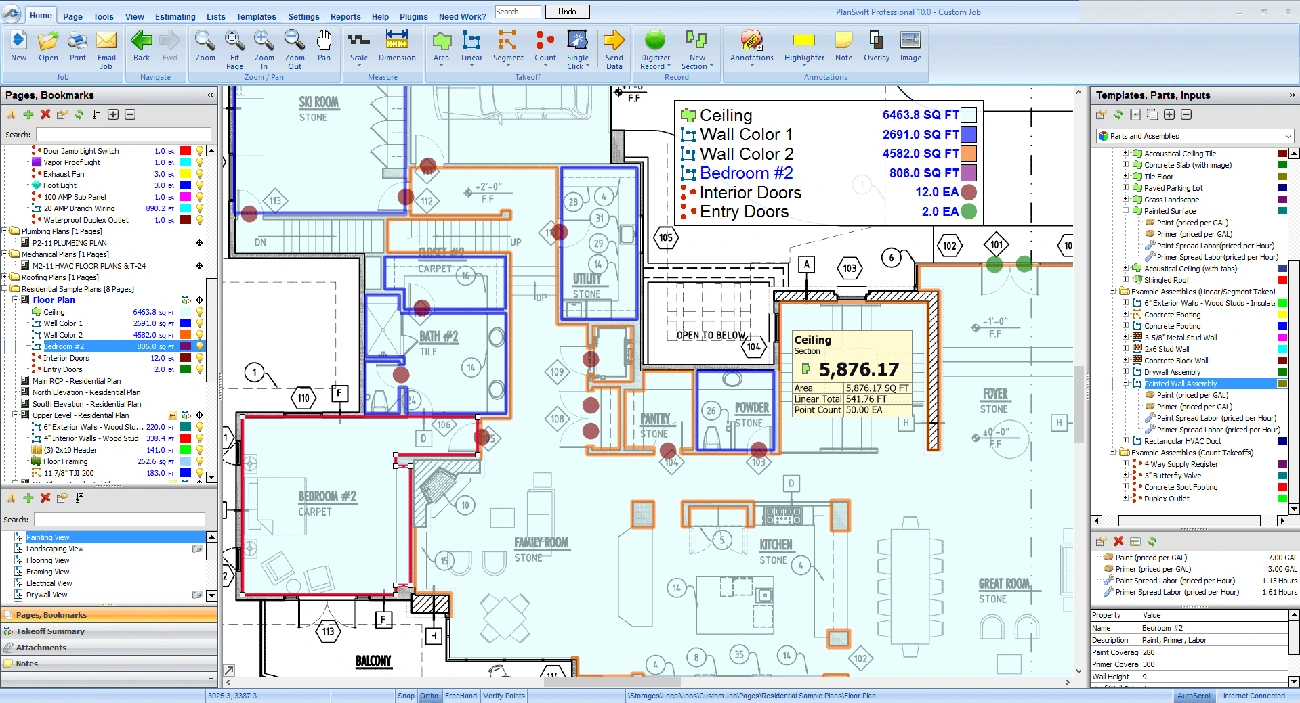
Drywall estimates go wrong when quantities are off, and they almost always get revised. Traditional takeoffs with rulers, highlighters, and spreadsheets are slow, hard to update, and easy to miscalculate.
Modern drywall estimating software changes that. Digital takeoff tools let contractors measure directly from plans, apply waste factors automatically, and generate material and labor quantities in minutes instead of hours. The result is faster bids, fewer change orders, and more predictable margins.
This guide explains what drywall estimating software actually does, how to estimate drywall step-by-step, and how to use software to bid faster without losing accuracy.
Key Takeaways
• Cut takeoff time dramatically — Digital takeoff tools typically reduce manual measuring time from hours to minutes, freeing your team to bid more work.
• Reduce math and transcription errors — Automated area calculations and built-in checks lower the risk of miscounts and rework.
• Use drywall-specific tools for quantities, not generic spreadsheets — The best systems handle sheet counts, waste factors (typically 10–15%), and real-world installation logic.
• Favor cloud tools that integrate with accounting — Look for QuickBooks (or similar) integration, real-time plan access, and PDF blueprint support.
• Follow a repeatable estimating process — Measure wall/ceiling areas, apply waste, calculate sheets, and standardize labor assumptions before pricing.
At typical subscription costs of $60–$250 per month, many contractors find the time savings and fewer scope misses justify the cost.
What is Drywall Construction Estimating Software?
Drywall construction estimating software is a specialized digital tool that makes it easier to calculate materials, labor, and costs for drywall projects. Traditional manual takeoffs still work, but they are slow and hard to update when plans change. These digital solutions have changed how contractors plan their projects and create bids.
The software lets contractors upload digital blueprints to measure areas and calculate exact quantities of materials they need. This includes drywall sheets, joint compound, screws, corner bead, and other components [[1]](https://www.stackct.com/drywall-estimating-software/). Contractors can now turn complex construction drawings into practical data for accurate bidding. Most platforms convert measured areas into sheet counts, accessories, and labor estimates automatically.
How it is different from general construction estimating tools
General construction estimating software works well for multiple trades but doesn't have the specific features needed for drywall work. Drywall-specific estimating tools are built to handle the unique aspects of drywall installation:
- Specialized calculations: The software measures wall and ceiling areas and automatically accounts for openings like doors and windows [[1]](https://www.stackct.com/drywall-estimating-software/).
- Material specificity: Instead of generic material categories, these tools have complete databases of actual drywall products, finishes, and accessories from many manufacturers [[2]](https://quickadminsoftware.com/blog/best-drywall-estimation-software-2025/).
- Installation logic: These tools calculate quantities based on how contractors buy and install drywall in real situations, not just theoretical measurements [[3]](https://www.iambuilders.com/articles/how-to-use-digital-takeoff-tools-for-faster-quantity-calculations/).
On top of that, it works with accounting and project management platforms like QuickBooks and Procore [[2]](https://quickadminsoftware.com/blog/best-drywall-estimation-software-2025/). This creates a continuous connection from estimation to project completion and keeps data consistent throughout the project.
Bottom line: general estimating tools are good for pricing, but drywall-specific tools are better for quantities. Many contractors still use Excel (or other spreadsheets) for pricing while relying on specialized takeoff software for measurements.
Why drywall-specific tools matter for accuracy and speed
Contractors need dedicated software because drywall estimation requires special attention. General estimation tools can't match what purpose-built solutions offer in precision and efficiency.
Digital takeoff tools can reduce manual measurement time by up to 80% compared with hand takeoffs. In practice, this often means estimates that used to take several hours can be completed in under an hour, depending on project complexity [[4]](https://www.countbricks.com/software/drywall-estimating-software-guide). Teams can bid on more projects without hiring extra staff.
Automation reduces calculation errors significantly. The software handles complex measurements with ease, even for irregular surfaces and unusual curves that are hard to measure by hand [[3]](https://www.iambuilders.com/articles/how-to-use-digital-takeoff-tools-for-faster-quantity-calculations/). This precision helps calculate waste too, usually adding factors of 10-15% based on how complex the project is [[2]](https://quickadminsoftware.com/blog/best-drywall-estimation-software-2025/).
Cloud-based solutions give team members access to project information anywhere - in the office or at the job site [[3]](https://www.iambuilders.com/articles/how-to-use-digital-takeoff-tools-for-faster-quantity-calculations/). Everyone works with the latest version of estimates, which keeps the project moving forward.
The best part is that drywall-specific software matches how contractors work in real life. It calculates quantities in sheets instead of square feet and organizes information in ways that make sense on the construction site.
This software streamlines what used to be a time-consuming process. Contractors now get precise estimates in a fraction of the time compared to manual methods.
Key Features to Look for in Drywall Estimating Software
The right drywall estimating software streamlines your bidding process. You need to focus on features that solve specific drywall work challenges. Let's look at what experienced contractors want in their drywall construction estimating software.
Digital blueprint support and takeoff automation
A good drywall estimating system must handle digital plans well. Modern software lets you upload PDF or CAD files right away without printing . You can measure directly from digital blueprints instead of using traditional scale rulers and printed plans [[6]](https://customdesigninnovations.com/transforming-drywall-estimation-the-digital-revolution-in-construction/).
The software's point-and-click tools calculate square footage, linear footage, and material counts precisely [[7]](https://squaretakeoff.com/drywall-estimating-software/). Quality systems have polygon tools for irregular spaces and automatic area calculations that factor in doors and windows. Being able to calibrate scale to a known dimension (e.g., a wall length) is critical for accuracy.
Advanced platforms work with digitizers to measure digital blueprints with great accuracy [[6]](https://customdesigninnovations.com/transforming-drywall-estimation-the-digital-revolution-in-construction/). This technology helps complete drywall takeoffs up to 80% faster than doing it by hand [[8]](https://www.buildxact.com/us/drywall-estimating-software/).
Labor and material cost databases
Accurate material databases are the foundations of precise drywall estimates. The software should have a big library of drywall products, finishes, and accessories from different manufacturers with current pricing [[9]](https://digitalestimating.com/what-to-include-in-drywall-estimating-software/).
The best tools sort databases by trade, which helps create estimates that match project needs [[6]](https://customdesigninnovations.com/transforming-drywall-estimation-the-digital-revolution-in-construction/). Contractors can quickly find needed supplies without spending hours on research.
Labor cost features matter just as much. The best software has features like Smart Labor® that adjust labor rates based on specific factors [[10]](https://estimatingedge.com/construction/drywall/). You could set different rates for standard 8-foot walls and taller walls that need ladder work and material lifting [[11]](http://estimatingedge.com/construction/drywall/). Look for tools that let you customize labor rates by wall height, ceiling work, and jobsite conditions.
Real-time updates and cloud access
Cloud systems now lead the way in modern drywall estimating. Your project data stays safe online, ready to access from any device with internet [[12]](https://www.tradeteksoftware.com/drywall-estimating-software). You can work on estimates at your desk and pick up right where you left off on your laptop at the job site [[12]](https://www.tradeteksoftware.com/drywall-estimating-software).
Updates happen instantly, so your team always sees the latest estimate versions [[1]](https://www.stackct.com/drywall-estimating-software/). Teams, subcontractors, and clients communicate better throughout the project because of this shared environment.
Most platforms let you control who sees what by setting permission levels for employees, partners, and stakeholders [[1]](https://www.stackct.com/drywall-estimating-software/). This keeps your data secure while making teamwork easier.
Integration with accounting tools like QuickBooks
Integration with accounting systems cuts out double data entry and keeps finances accurate [[13]](https://www.werxapp.com/industries/drywall/drywall-estimating-software/). Look for software that works directly with QuickBooks or Sage [[4]](https://www.countbricks.com/software/drywall-estimating-software-guide).
Top integration features should let you:
- Link takeoff assemblies with accounting software lists [[14]](https://totaltakeoffs.com/software-integration/intuit-quickbooks/)
- Create project budgets that move straight to QuickBooks [[14]](https://totaltakeoffs.com/software-integration/intuit-quickbooks/)
- Import takeoff line items into estimates quickly [[14]](https://totaltakeoffs.com/software-integration/intuit-quickbooks/)
- Sync customers, items, estimates, invoices, and payments [[15]](https://quickbooks.intuit.com/app/apps/appdetails/contractortools/en-us/)
This connected system creates a smooth pre-construction process that saves time and reduces mistakes [[14]](https://totaltakeoffs.com/software-integration/intuit-quickbooks/).
Support for commercial and residential drywall jobs
Most contractors need software that works well for different projects. Quality drywall estimating software should handle both commercial and residential jobs equally well [[10]](https://estimatingedge.com/construction/drywall/).
The system needs flexible project templates for different building types—modern, industrial, and residential [[9]](https://digitalestimating.com/what-to-include-in-drywall-estimating-software/). The best software works with rated and non-rated walls [[11]](http://estimatingedge.com/construction/drywall/) and manages everything from small room updates to big commercial projects.
Your software choice should grow with your company and handle projects of any size [[1]](https://www.stackct.com/drywall-estimating-software/). This flexibility means your investment stays valuable as you take on bigger jobs.
How to Estimate Drywall: A Step-by-Step Example

Image Source: vCalc
Drywall estimation needs careful measurement and calculation. You need to protect your profits with accurate bids, whether you're new to contracting or a seasoned pro. Here's a step-by-step breakdown of the process.
Measuring wall and ceiling square footage
Start with your tape measure and notepad. Calculate each wall's square footage by multiplying length by height. A wall that's 10 feet wide and 8 feet high gives you 80 square feet [[16]](https://contractorplus.app/blog/how-to-estimate-drywall-material-cost). You'll need to do this for every wall in the room.
The ceiling calculation is length times width. A ceiling measuring 10 by 12 feet equals 120 square feet [[17]](https://contractorplus.app/blog/how-to-calculate-drywall-square-footage). These measurements are the foundations of your estimate, so record them carefully.
Using a drywall sheet calculator
Your total square footage helps determine the number of sheets needed. Standard drywall sheets come in 4×8 (32 square feet each), 4×10, or 4×12 sizes [[18]](https://masterestimators.com/blog/drywall-material-takeoff-guide/).
Find your sheet quantity by dividing total square footage by single sheet area:
- For 4×8 sheets: Total square feet ÷ 32 = Number of sheets [[19]](https://buildbook.co/calculators/drywall-calculator)
- For 4×12 sheets: Total square feet ÷ 48 = Number of sheets [[18]](https://masterestimators.com/blog/drywall-material-takeoff-guide/)
Round up to the nearest whole sheet. Larger projects benefit from a drywall sheet calculator that speeds up this process.
Applying a waste factor (10–15%)
Waste happens in every drywall job. Most pros add 10-15% extra to cover cutting losses, mistakes, and damage [[20]](https://www.activeestimating.com/post/drywall-waste-factors-are-you-overestimating). You might need a higher waste factor for complex layouts with many angles or curves. For simple rectangular rooms, 10% is common; for complex layouts with many angles or openings, 12–15% is more realistic.
This buffer is vital—you'll waste time and money on extra supply runs without it. Bidi can automatically generate drywall quantities from your plans, so you can spend your time pricing and reviewing scope instead of hand-measuring every sheet.
Estimating labor hours per sheet
Labor makes up 60-70% of total drywall project costs [[21]](https://quantifyna.com/labor-cost-to-hang-and-finish-drywall/). Most contractors estimate about 0.018 labor hours per square foot for hanging, finishing, and primer prep [[22]](https://www.finehomebuilding.com/forum/time-estimate-to-hang-drywall).
A 4×8 sheet (32 sq ft) needs about 0.58 labor hours to install and finish. Project specifics like ceiling height, access issues, or complex designs might change this baseline.
Handling doors and windows: deduct or not?
The debate continues about deducting openings from square footage calculations. Many pros measure right through doors and windows [[23]](https://www.drywalltalk.com/threads/measuring-estimating-methods.14649/). Here's why:
- Material waste still comes from cutouts
- Opening cuts need extra labor time
- Small scraps rarely get used
Rooms with large glass areas might justify deducting some window space [[23]](https://www.drywalltalk.com/threads/measuring-estimating-methods.14649/).
Example: Estimating drywall for a 12x12 room
Let's work through a 12×12 room with 8-foot ceilings:
- Wall area: (12 × 8 × 4) = 384 square feet
- Ceiling area: 12 × 12 = 144 square feet
- Total area: 384 + 144 = 528 square feet [[24]](https://www.drywalltalk.com/threads/how-many-sheets-an-hour.5494/)
- Sheets needed: 528 ÷ 32 = 16.5 sheets (round up to 17)
- Adding 10% waste: 17 × 1.1 = 18.7 (round to 19 sheets)
- Labor estimate: 528 × 0.018 = 9.5 hours
Your actual labor hours may vary based on crew experience, ceiling height, and finishing level. Compare your calculations with Bidi's automated drywall takeoff software. You'll save time and improve accuracy.
Getting Started with Drywall Takeoff Software
Digital drywall takeoff software makes the switch from traditional methods easy with a step-by-step approach. Contractors save time once they learn the simple workflow.
Uploading plans and setting scale
Your first step is to upload digital blueprints into the software platform. Modern drywall takeoff software works directly with PDF files without printing [[3]](https://www.iambuilders.com/articles/how-to-use-digital-takeoff-tools-for-faster-quantity-calculations/). Here's what you need to do:
- Check if all pages are complete and in order
- Set the correct scale before measuring
- Fine-tune using a known dimension for accuracy [[3]](https://www.iambuilders.com/articles/how-to-use-digital-takeoff-tools-for-faster-quantity-calculations/)
Accurate scaling is vital—wrong measurements can get pricey with estimation errors. The software lets you adjust line widths to see measurements better on your screen .
Creating reusable templates for repeat jobs
Templates help you estimate similar projects faster. You can create effective templates by:
- Building and testing a sample project really well
- Keeping your pricing structure while removing quantities
- Saving a clean version as your template [[2]](https://quickadminsoftware.com/blog/best-drywall-estimation-software-2025/)
These templates become your ready-to-use frameworks with standard configurations, so you'll never start from zero [[2]](https://quickadminsoftware.com/blog/best-drywall-estimation-software-2025/). Templates work great for projects that follow manufacturer specs or contractors who handle similar jobs often.
Training your team for faster adoption
Good training helps everyone discover the software's full potential. Your team can learn through:
- In-person classroom sessions
- Virtual workshops
- Video tutorials
- One-on-one customized training [[26]](https://estimatingedge.com/training-edge/)
Make sure to give each team member enough practice time. Quality training reduces estimation errors, speeds up projects, and improves team efficiency [[2]](https://quickadminsoftware.com/blog/best-drywall-estimation-software-2025/). Many providers offer custom training packages that fit different budgets and meet specific needs.
Using takeoff automation for drywall quantities
Takeoff automation can deliver significant time savings. A drywall contractor found that digital takeoff systems with assemblies cut down a 12,000 SF office build-out estimation from almost a full day to just 40 minutes [[3]](https://www.iambuilders.com/articles/how-to-use-digital-takeoff-tools-for-faster-quantity-calculations/). Upload a plan to a digital takeoff tool and compare the results to your current process.
Maximizing ROI with Estimating Software
Drywall estimation software delivers measurable returns that affect your bottom line. Let's get into how to measure these benefits.
Tracking time saved on takeoffs
The numbers tell a compelling story. Contractors who use digital takeoff tools complete drywall estimates 80% faster than traditional methods [[2]](https://quickadminsoftware.com/blog/best-drywall-estimation-software-2025/). A drywall contractor cut down takeoff time for a 12,000 SF office from a full day to just 40 minutes [[3]](https://www.iambuilders.com/articles/how-to-use-digital-takeoff-tools-for-faster-quantity-calculations/). This time efficiency converts to labor cost savings—roughly $45 per hour for each estimator [[2]](https://quickadminsoftware.com/blog/best-drywall-estimation-software-2025/).
Reducing errors and rework
Precision brings more value than just saving time. Digital estimation tools cut down errors through:
- Automated quantity calculations
- Built-in auditing capabilities
- Centralized cost databases
- Visual confirmation of scope
These improvements reduce rework by up to 50% [[2]](https://quickadminsoftware.com/blog/best-drywall-estimation-software-2025/) and minimize costly mistakes during bidding. Project profitability depends on accurate estimates, and automated error detection features protect your margins [[2]](https://quickadminsoftware.com/blog/best-drywall-estimation-software-2025/).
Bidding more jobs with the same team
Run your plan through Bidi and compare
Results speak volumes. Bidi generates quick, accurate drywall estimates you can compare with your current process. Contractors find they can boost win rates and revenue growth [[1]](https://www.stackct.com/drywall-estimating-software/) while cutting overhead costs.
Drywall estimating software goes beyond faster bids—it creates predictable revenue through cleaner, more accurate proposals [[3]](https://www.iambuilders.com/articles/how-to-use-digital-takeoff-tools-for-faster-quantity-calculations/).
Conclusion
Drywall estimating software improves how contractors handle project bidding and execution. This piece shows how these digital tools improve accuracy and speed. Your team can bid more jobs with the same staff thanks to the time savings.
The investment makes sense when you look at the numbers. A monthly subscription often in the $60–$250 range can pay for itself by eliminating many hours of manual estimation work each week. On top of that, it helps prevent mistakes that can get pricey and create extra work.
Digital takeoffs mark a complete transformation from old-school pencil-and-paper methods. Contractors now click through digital plans to create accurate material lists and labor requirements instead of wrestling with rulers and calculators. This optimized approach works great for complex commercial projects and simple residential jobs alike.
Note that your success depends on proper setup and training. You need to create reusable templates, train your team on the software, and keep accurate material and labor databases. Your estimation process becomes more reliable with each completed project.
Competition runs high in the contracting business. Tools that help you create faster, more accurate bids give you a real edge. Drywall estimating software does more than save time - it improves your entire project approach from the original takeoff through final execution.
If you're still doing manual drywall takeoffs, upload your next plan to a digital tool and compare the results to your current process. Most contractors find they save meaningful time on measurements without changing how they price their jobs.
FAQs
Q1. How much time can drywall estimating software save compared to manual methods? Drywall estimating software can reduce takeoff time by up to 80% compared to traditional manual methods. This means contractors can complete estimates in a fraction of the time, allowing them to bid on more jobs without expanding their team.
Q2. What are the key features to look for in drywall estimating software? Important features include digital blueprint support, automated takeoffs, comprehensive material and labor cost databases, real-time updates with cloud access, integration with accounting tools like QuickBooks, and support for both commercial and residential projects.
Q3. How does drywall-specific software differ from general construction estimating tools? Drywall-specific software offers specialized calculations for wall and ceiling areas, includes databases of actual drywall products and accessories, and calculates quantities based on how drywall is purchased and installed in the field, providing greater accuracy and efficiency for drywall contractors.
Q4. Can drywall estimating software help reduce errors and rework? Yes, digital estimation tools can significantly reduce errors through automated calculations, built-in auditing capabilities, and visual confirmation of scope. This precision can often lead to a reduction in rework by up to 50%, helping to protect project profitability.
Q5. Is it difficult to implement drywall estimating software in a contracting business? While there is a learning curve, most contractors find implementation straightforward with proper training. Many software providers offer various training options, including in-person sessions, virtual workshops, and video tutorials. Creating reusable templates and allocating practice time for team members can speed up adoption and maximize the software's benefits.


