
title: Mastering Construction Estimating in Excel - A Comprehensive Guide
description: Best practices for construction estimating in Excel — from setup and formulas to integrating Bidi for takeoffs. Practical tips for contractors.
author: Weston Burnett
authorEmail: weston@bidicontracting.com
publishedAt: "2026-02-11"
category: Construction
tags: ["Excel", "Construction Estimating", "Spreadsheets", "Takeoffs", "Bidi"]
featured: true
readingTime: 10
seoKeywords: ["construction estimating excel", "excel estimating spreadsheet construction", "construction cost estimate template excel", "excel takeoff construction", "free construction estimating spreadsheet", "construction estimating in excel guide", "how to estimate construction costs in excel"]
Most contractors don't lose money because they can't do math — they lose it because takeoffs take too long, get messy, or get revised three times. Construction estimating in Excel is still a solid way to price jobs and build proposals, but Excel was never built for measuring plans or managing constant revisions. This guide shows a clean Excel setup for pricing (materials, labor, markups), plus the simplest way to stop manual takeoffs from becoming your bottleneck.
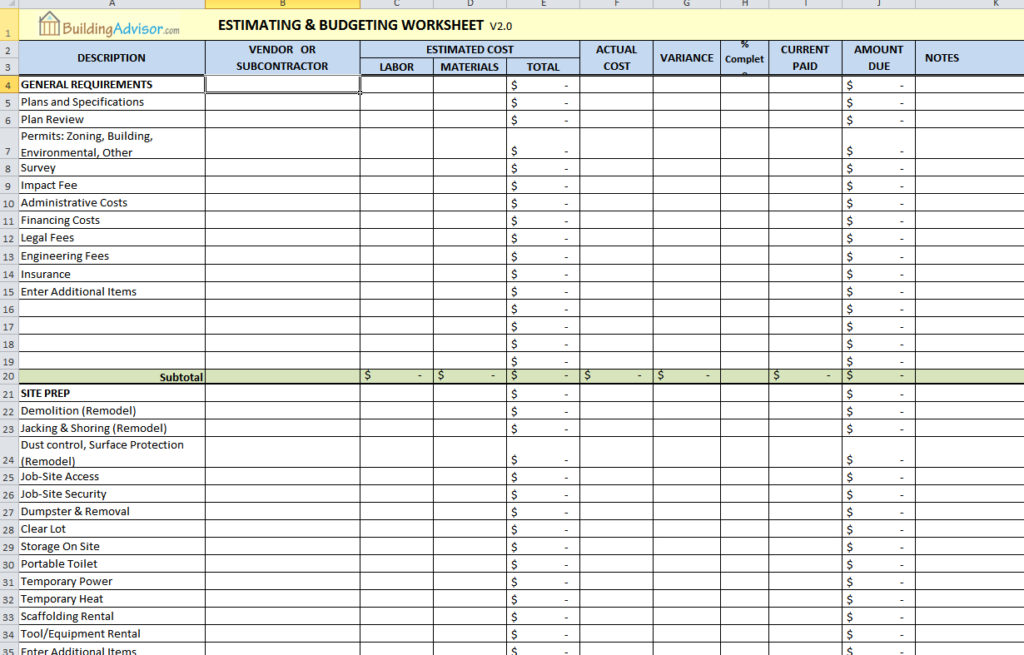
Image Source: BuildingAdvisor
Understanding the Role of Excel in Construction Estimating
Excel has long been a staple in the construction industry, serving as a powerful tool for managing costs and generating estimates. Its versatility allows users to create customized spreadsheets tailored to specific project requirements. Where Excel breaks down is construction takeoffs and revisions — measuring plans, tracking change, and keeping everyone on the same version. For many small and mid-sized contractors, construction estimating in Excel remains the default starting point before adopting more specialized tools. Many estimators share templates and workflows in communities like Reddit's r/estimators.
The Strengths of Excel
- Cost Organization: Excel allows contractors to categorize expenses, making it easy to track materials, labor, and overhead costs. This organization is vital for creating accurate estimates and proposals.
- Customizability: Users can design their spreadsheets to fit their unique needs, from simple residential projects to complex commercial builds. This adaptability is one of Excel's most significant advantages.
- Robust Formulas: Excel's built-in formulas enable users to perform complex calculations, reducing the risk of errors and saving time. Custom formulas can be set up to calculate everything from material costs to project timelines.
The Limitations of Excel
Despite its strengths, Excel consistently breaks down for takeoffs — it was never built for measuring plans, tracking revisions, or handling scale. Large projects with numerous revisions can overwhelm the software, leading to inaccuracies and inefficiencies. Additionally, collaboration among team members can be challenging, as multiple users working on the same document may encounter version control issues.
Setting Up Your Construction Estimating Spreadsheet
Creating an effective estimating spreadsheet in Excel requires careful planning and organization. Platforms like Smartsheet provide widely used construction estimate templates that mirror many of these best practices. Here’s a step-by-step guide to help you set up your construction cost estimate spreadsheet.
1. Define Key Sections
Begin by outlining the essential components of your estimate. This typically includes:
- Header Information: Include project details such as the project name, client information, date, and estimator's name.
- Cost Categories: Organize your estimate into sections for materials, labor, equipment, subcontractors, and overhead.
2. Create Columns for Essential Details
For each cost category, set up columns to track vital information:
- Item Description: Specify each item or task, such as "Concrete" or "Framing Labor."
- Quantity: Enter the amount needed for each item.
- Unit of Measure (UoM): Define the units (e.g., square feet, hours).
- Unit Cost: Input the cost per unit.
- Total Cost Calculation: Use formulas to automatically calculate total costs by multiplying quantity by unit cost.
3. Apply Basic Formulas
Use Excel's SUM function to total costs for each section. For example, use `=SUM(D2:D10)` to calculate the total for a column of costs. Adding a grand total at the bottom will provide a comprehensive overview of your estimate.
4. Formatting for Clarity
To enhance readability, format your spreadsheet appropriately:
- Currency Format: Set cost columns to currency format for clarity.
- Borders and Shading: Use borders to separate sections and shading for headers to create a clean layout.
5. Save as a Template
If you plan to use the spreadsheet for multiple projects, save it as a template. This allows you to start with a pre-filled structure, saving time on future estimates. Tip: add a 'Version' cell in the header (e.g., V1, V2, Rev-3) so you can tie estimates to plan sets and avoid pricing the wrong drawings.
The 7 Essential Formulas Every Construction Estimating Spreadsheet Needs
Most Excel estimating mistakes aren't math problems — they're formula problems. The right set of functions turns a static spreadsheet into a self-calculating estimate that's fast to update and hard to break. Here are the seven formulas that belong in every construction cost estimate spreadsheet.
1. SUM — The Foundation of Every Estimate
Every cost section needs a running total. Use `=SUM(D2:D20)` to add up a range of line-item totals, and stack those section sums into a grand total at the bottom. Avoid manually typing totals — one miskeyed number can throw off the entire bid.
```excel
=SUM(D2:D20) ' Total for a materials section
=SUM(F2,F10,F18) ' Grand total pulling from section subtotals
```
2. IF — Conditional Pricing Logic
Use IF to apply logic automatically. The most common use in estimating: applying a premium markup for rush jobs or flagging items that exceed a cost threshold.
```excel
=IF(B2="Rush", C2*1.25, C2*1.15)
' Applies 25% markup if job type is Rush, otherwise 15%
```
This is cleaner than manually changing markup percentages line by line — and it prevents the mistake of forgetting to adjust one row.
3. VLOOKUP / INDEX-MATCH — Material Price Lookup
If you maintain a separate pricing sheet (or paste in a current price list), VLOOKUP or INDEX-MATCH lets you pull current unit costs into your estimate automatically without retyping them.
```excel
=VLOOKUP(A2, PriceList!A:B, 2, FALSE)
' Looks up the item in column A against your price table, returns the unit cost
=INDEX(PriceList!B:B, MATCH(A2, PriceList!A:A, 0))
' INDEX-MATCH equivalent — more flexible and doesn't break when columns shift
```
INDEX-MATCH is the better long-term choice because it won't break if you insert a column into your price table. Use VLOOKUP if simplicity matters more than flexibility.
4. Nested IF — Markup Tiers
Many contractors use tiered markup: smaller jobs get a higher overhead margin, larger jobs get a lower one. Nested IFs handle this cleanly.
```excel
=IF(E2<10000, E2*1.25, IF(E2<50000, E2*1.18, E2*1.12))
' < $10K: 25% markup
' $10K–$50K: 18% markup
' > $50K: 12% markup
```
Keep nesting to three levels maximum — beyond that, consider a lookup table instead.
5. ROUND — Clean Bid Numbers
Raw calculations often produce numbers like $14,237.66. For proposals, rounding to the nearest dollar (or nearest $100) looks more professional and avoids giving clients a false sense of precision on rough estimates.
```excel
=ROUND(D2*1.15, 2) ' Round to cents
=ROUND(D2*1.15, -2) ' Round to nearest $100
```
6. SUMIF — Trade-Specific Subtotals
On multi-trade jobs, you want subtotals by trade (framing, electrical, plumbing) without a separate tab for each. SUMIF pulls subtotals based on a category label in a column.
```excel
=SUMIF(B:B, "Electrical", D:D)
' Adds up all rows in column D where column B says "Electrical"
```
This is especially useful for break-out summaries in your proposal — clients often want to see the bid broken down by trade, not just a single number.
7. Data Validation — Preventing Input Errors
Data validation isn't a formula, but it belongs in this list because it prevents the errors that formulas can't catch. Create a dropdown list for unit types (SF, LF, EA, HR) so nobody types "sq ft" in one row and "SF" in another — both of which would break a SUMIF.
To add: Data tab → Data Validation → Allow: List → Source: SF, LF, EA, HR, LS
Data validation also works well for locking down job type, trade category, and cost phase dropdowns. The less free-text entry in your estimate, the fewer formula mismatches.
Best Practices for Construction Estimating in Excel
STACK has a helpful overview of common pitfalls and best practices when estimating in Excel. Clear structure and repeatable formulas are what separate messy spreadsheets from effective construction estimating in Excel. To ensure accuracy and efficiency in your estimating process, consider the following best practices:
1. Use Absolute and Relative References
Understanding the difference between absolute and relative cell references is crucial. Absolute references remain constant when copied, while relative references change based on their position. This knowledge is essential for applying consistent markups across your estimates. For example, lock your overhead/profit % cells with absolute references so your markup doesn't shift when you copy formulas down the sheet.
2. Implement Data Validation
To standardize entries and prevent errors, use Excel's Data Validation feature to create dropdown lists. This ensures that users can only select predefined options, reducing the likelihood of mistakes.
3. Use Conditional Formatting
Conditional formatting allows you to highlight specific data points based on criteria. For example, you can flag totals that exceed a certain threshold, helping you identify potential issues before finalizing your estimates.
4. Regularly Review and Update Your Estimates
Construction projects often undergo changes, so it's essential to review and update your estimates regularly. This practice helps maintain accuracy and ensures that your estimates reflect the latest project information.
Building a Takeoff Tab in Excel: The Right Way
Most contractors make one structural mistake with their Excel estimates: they mix the takeoff (quantities) and the pricing (costs) on the same tab. This creates a spreadsheet that's hard to audit, hard to revise, and easy to break. Separating these two concerns is the single biggest improvement you can make to your Excel estimating setup.
Separate the Takeoff Tab from the Pricing Tab
Your Takeoff tab should contain nothing but quantities:
- Item description
- Measurement (length, area, count)
- Notes (e.g., "per plan set Rev-2")
Your Pricing tab pulls from the Takeoff tab using cell references or named ranges. It adds:
- Unit cost
- Labor rate
- Waste factor
- Total cost
The benefit: when the owner issues revised plans, you update the Takeoff tab and the Pricing tab recalculates automatically. No re-entry, no risk of updating the quantity but forgetting to update the extended cost.
Use Named Ranges
Instead of referencing `Takeoff!C14` in your Pricing tab, name that cell `ConcreteSlab_SF` and reference it as `=ConcreteSlab_SF`. This makes formulas readable and dramatically reduces errors when rows shift.
To name a range: select the cell or range → Name Box (top left) → type the name → Enter.
Naming conventions that work well for construction:
- `[Material]_[Unit]` — e.g., `Framing_LF`, `Drywall_SF`
- `[Phase]_[Item]` — e.g., `Foundation_CY`, `Rough_Hours`
Organize by CSI Division
If you're doing commercial or multi-trade work, organize both your Takeoff and Pricing tabs by CSI MasterFormat division. This makes it easy to:
- Sub out specific trades (just hand them Division 15, not the whole spreadsheet)
- Compare estimates across jobs
- Build historical cost data by CSI code
For residential, you can use a simplified phase structure: Site Work → Foundation → Framing → Envelope → Rough MEP → Finishes → Exterior.
Flow Quantities Automatically into Pricing
The Takeoff tab should be the single source of truth for quantities. Use direct cell references or named ranges to pull each quantity into the Pricing tab. Never type the same number in two places — if it changes, you'll only update one, and the other will be wrong.
Example setup:
| Takeoff Tab | Pricing Tab |
|---|---|
| `B4` = 1,240 SF (slab area) | `=Takeoff!B4` or `=Slab_SF` |
| `B5` = 180 LF (footing perimeter) | `=Takeoff!B5` or `=Footing_LF` |
This structure — separate tabs, named ranges, CSI organization, automatic flow-through — is what separates an Excel estimate that holds up to revisions from one that falls apart after the first scope change.
Construction Estimating Excel Templates: Free vs. Paid vs. Build Your Own
When you're starting out (or rebuilding your process), you have three options. Each has a place depending on where you are in your estimating maturity.
Free Templates
Smartsheet's construction estimate templates are the most commonly used free starting point. They cover residential remodel, commercial construction, and trade-specific formats. BuildingAdvisor's free estimating spreadsheet is another widely shared option, particularly for new-home construction — it's more structured than most free templates and includes a cost breakdown by phase.
What you get: a clean structure, basic formulas, and a starting format you can adapt. What you don't get: your labor rates, your material costs, your markup logic, or anything specific to how you actually build.
Free templates are best for: contractors just starting with Excel estimating, or anyone who wants to understand the structure before building from scratch.
Paid Pre-Built Systems
Pre-built Excel estimating systems (available on Etsy, estimating-specific sites, or from trade associations) typically run $50–$300. They usually include:
- Built-out assemblies by trade
- Cost databases (often RSMeans-based or regionally adjusted)
- Markup calculators and proposal output tabs
Paid systems are worth it when you want a fully working setup immediately and don't have time to build one from scratch. The downside: they're built around someone else's workflow, and adapting them to yours can take as much time as building your own.
Build Your Own
Once you've used Excel for estimating for a year or more, you know exactly what you need — and what you don't. Building your own system at that point is often the right call. You'll build precisely around your trade, your markup structure, your labor rates, and your proposal format.
The best time to build your own: after you've used a template (free or paid) long enough to know where it breaks down for you. That frustration becomes your spec.
Integrating Bidi into Your Workflow
Excel is strong for pricing and proposals, but construction takeoffs are where most spreadsheets turn into a time sink. If you want to keep Excel for pricing while eliminating manual measurement, tools like Bidi can automate takeoffs so you spend time pricing work — not counting it.
1. Streamlining the Takeoff Process
Using Bidi for takeoffs can significantly reduce the time spent measuring plans. This automation allows you to quickly gather quantities, which can then be imported into your Excel estimating spreadsheet.
2. Maintaining a Hybrid Workflow
For contractors who prefer to keep using Excel for pricing, a hybrid workflow can be highly effective. By using Bidi for takeoffs and Excel for pricing, you can streamline your estimating process without sacrificing familiarity.
3. Emphasizing Flexibility
You don't have to change your whole workflow to get a big speed win. Many contractors keep Excel for pricing and use takeoff automation only for quantities. The right setup is the one that reduces rework and helps you bid faster with fewer misses.
Quality Control Checks for Accurate Estimates
Regardless of the tools you use, implementing quality control checks is essential for ensuring the accuracy of your estimates. Here are some best practices to consider:
1. Cross-Check Schedules Against Plans
Regularly compare your estimates with project plans to ensure consistency. This practice helps identify discrepancies and ensures that your estimates align with project requirements.
2. Validate Large Quantities
Pay special attention to large quantities in your estimates. Double-check these figures to avoid costly errors that could impact your project's budget.
3. Apply Waste Factors
Incorporating waste factors into your estimates can help account for material loss during construction. This practice ensures that your estimates are more accurate and reflective of actual project needs.
4. Peer Review Risky Items
Encourage team members to review estimates, particularly for high-risk items. This collaborative approach can help identify potential issues and improve overall accuracy.
When Excel Breaks Down: Recognizing Limitations
While Excel is a valuable tool, there are scenarios where it may struggle to meet your needs. More formal guides, such as Pearson's book *Construction Estimating Using Excel*, document these scaling challenges in detail. Recognizing these limitations can help you make informed decisions about your estimating process.
1. Large Projects
For extensive projects with numerous revisions, Excel can become unwieldy. Large files may slow down performance, making it challenging to navigate and update estimates effectively.
2. Frequent Plan Changes
If your projects frequently change, maintaining accurate estimates in Excel can be difficult. Each revision may require significant updates, increasing the risk of errors.
3. Team Collaboration Challenges
Collaborating with multiple team members on the same Excel document can lead to version control issues. Ensuring that everyone is working with the most up-to-date information can be a challenge. As projects scale, many teams outgrow construction estimating in Excel even if it still works well for smaller jobs.
A project estimator at a GC in Atlanta described the version control problem firsthand: "We had two estimators working on a $2.8M bid. One was doing MEP, one was doing civil and structure. We both saved different versions of the same file to a shared drive with slightly different names. On bid day I merged them manually. Except I grabbed the wrong version of the MEP tab — I used the one from two days earlier, before my partner had updated it based on a scope clarification. We won the job and went to buy out the mechanical sub. His number was $19,000 higher than what I'd bid. Cost us $19,000 to make it right. Now we use a master file with one owner and locked tabs."
Transitioning to AI Takeoffs: A Solution for Scaling
As construction projects grow in complexity, many contractors are turning to AI-powered solutions like Bidi for takeoffs. These tools can help streamline the estimating process and improve accuracy.
1. Enhancing Efficiency
AI takeoff solutions can quickly analyze plans and generate accurate quantities, significantly reducing the time spent on manual measurements. This efficiency allows contractors to focus on pricing and proposal generation.
2. Improving Accuracy
By automating the takeoff process, AI solutions can help minimize errors associated with manual measurements. This accuracy is crucial for maintaining project budgets and timelines.
3. Scaling Your Business
As your business grows, adopting AI-powered tools can help you manage larger projects more effectively. These solutions can handle increased data complexity, allowing you to take on more work without sacrificing quality.
Frequently Asked Questions
Is Excel good enough for construction estimating?
Excel works well for pricing and proposal generation, especially for small to mid-size contractors. Where it breaks down is takeoffs — measuring plans, tracking revisions, and collaborating across a team. For those tasks, purpose-built tools save significant time. Many contractors run a hybrid: Excel for pricing, takeoff software for quantities.
What formulas do I need for a construction estimate in Excel?
The seven most useful are: SUM (section totals), IF (conditional markup logic), VLOOKUP or INDEX-MATCH (pulling unit costs from a price list), nested IF (tiered markup by job size), ROUND (clean bid numbers), SUMIF (trade-specific subtotals), and Data Validation (preventing input errors in dropdown fields).
What's the best free construction estimating spreadsheet?
Smartsheet and BuildingAdvisor both offer widely used free templates. Smartsheet covers residential, commercial, and trade-specific formats. BuildingAdvisor's template is more structured and better suited to new-home construction. Both give you a solid starting structure — you'll still need to add your own labor rates, material costs, and markup logic.
How do I prevent version control problems in Excel estimates?
The most reliable approach: one master file with a single owner, locked tabs for sections other team members shouldn't edit, and a version cell in the header (V1, V2, Rev-3) tied to the plan set revision. Never email copies back and forth — use a shared drive with clear naming conventions and a designated owner who merges updates.
When should I stop using Excel and switch to estimating software?
The clearest signal is when revisions start costing you more time than the estimate itself. If updating quantities after a plan change takes more than an hour, or if you've had a version-control mistake affect a live bid, you've likely outgrown Excel for takeoffs. The pricing side can stay in Excel longer — but manual measurement is usually the first thing to replace.
Can I use Excel for takeoffs as well as pricing?
You can, but it's not what Excel is built for. Measuring plans in Excel means manually counting or scaling from PDFs, which is slow and error-prone. A better setup is to use takeoff software for quantities and feed those numbers into your Excel pricing sheet. That keeps Excel doing what it does well while eliminating the manual measurement bottleneck.
Conclusion: Finding the Right Balance
The bottom line is, Excel remains a valuable tool for construction estimating, particularly for pricing and proposal generation. However, recognizing its limitations is essential for optimizing your workflow. By integrating tools like Bidi for takeoffs, contractors can streamline their estimating processes and improve accuracy.
If you want to keep Excel for pricing but eliminate manual takeoffs, run your next plan through Bidi and compare the quantities to your current process. It's the fastest way to see whether takeoff automation saves you time — without ripping out Excel.
*Reviewed by Weston Burnett, Co-Founder and CTO of Bidi Contracting.*


