It's Thursday afternoon. The bid is due Friday at 2 p.m. You're 80% through your estimate when you realize your electrical sub quoted a shell-and-core scope while the drawings clearly show a full tenant fit-out. That one missed line item — easily $40,000 to $80,000 on a mid-size commercial project — doesn't just hurt your margin. It can erase it entirely.
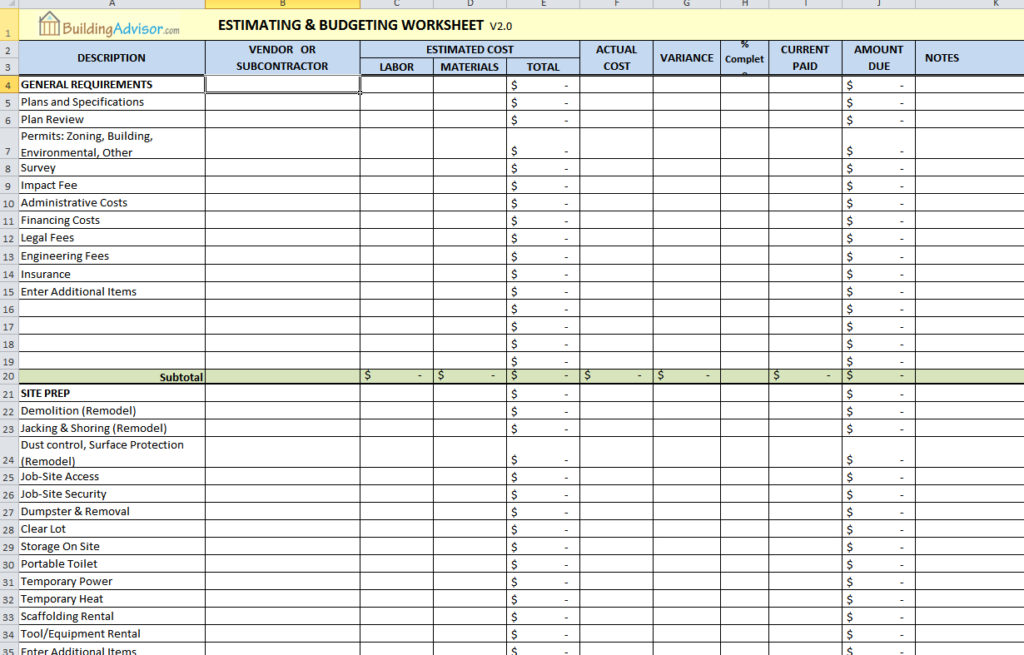
Most construction estimate checklists fail working GCs for a simple reason: they're template-first, not process-first. They hand you a spreadsheet with labeled columns and assume the hard thinking is done. It isn't. The template is the last 10% of the job. The first 90% is a disciplined sequence of decisions — scope, takeoff, labor, subs, overhead, risk — that no Excel tab can make for you.
This construction estimate checklist gives you that sequence. Ten field-tested steps that cover every major cost driver from the first drawing review to the final bid submission. Follow them in order and you'll stop leaving money on the table — in both directions.
Step 1: Lock Down the Scope Before You Touch a Number
Scope ambiguity is the root cause of most blown estimates — not math errors, not material price swings. Before you open a takeoff tool or pull up a cost estimate template, you need a complete picture of what you're building and who's responsible for every piece of it.
Start with a full drawing and specification review. Log every RFI, addendum, and clarification issued before bid day. If you're estimating construction from scratch on a project with incomplete documents, that incompleteness itself is a cost — and it needs to show up in your contingency.
Read the Spec Book, Not Just the Drawings
Drawings show geometry. Specs show obligations. Division 1 general requirements alone can contain scope that adds 2–5% to your total project cost: temporary facilities, testing and inspection requirements, project closeout deliverables, and owner-furnished allowances that you're expected to install.
Go through Division 1 line by line before you price a single trade. Flag every allowance, every testing requirement, every phasing constraint. These items don't appear on floor plans, but they absolutely appear on invoices.
Project-specific specs in Divisions 2 through 49 (or 2 through 16 in the older 16-division format) often contain material substitution restrictions, installation standards, and warranty requirements that affect both your material selection and your labor pricing. For detailed guidance on interpreting these requirements, see our guide on how to read construction specifications. Miss them in estimating and you'll negotiate them painfully during construction.
Define What's In and What's Out in Writing
Before the first takeoff line, build a written scope inclusion/exclusion log. One column for what you're including, one for what you're explicitly excluding, one for what's been clarified by the owner or design team.
This document does two things. First, it forces you to make decisions during estimating rather than during construction. Second, it becomes your first line of defense in scope disputes after award. A GC who can point to a written exclusion log dated before bid submission is in a fundamentally different legal and commercial position than one who relied on a verbal understanding.
Step 2: Build Your Material Takeoff Construction Line by Line
Jumping straight to a cost estimate template without a clean material takeoff is the single biggest estimating mistake working GCs make. The template gives you structure. The takeoff gives you numbers. Without accurate quantities, the structure is meaningless.
A disciplined material takeoff construction process means counting and measuring every item in the scope — not estimating from memory, not copying from a similar past project without verifying the differences. Quantities drive everything downstream: material cost, labor hours, equipment needs, and sub scope definitions. For a complete walkthrough of the takeoff process, see our step-by-step guide to construction takeoffs.
Organize Takeoffs by CSI Divisions Construction Estimating Framework
The Construction Specifications Institute's MasterFormat organizes construction scope into 50 divisions — from Division 01 (General Requirements) through Division 49 (Process Gas and Liquid Handling). For most commercial GC work, Divisions 02 through 16 in the legacy format (or the equivalent MasterFormat 2016 groupings) cover the full building scope.
Organizing your material takeoff by CSI divisions construction estimating framework does two things immediately. It prevents scope omissions by forcing you to walk through every division systematically, and it maps directly to a construction cost codes list that your accounting system can consume for job costing. When your estimate codes match your job cost codes, budget-to-actual tracking happens automatically — not as a post-award rebuild.
A construction cost codes list built on CSI divisions also makes sub scope packages cleaner. When you hand a mechanical sub a scope package organized by Division 15 (or MasterFormat Division 23 for HVAC), both parties are working from the same taxonomy. Disputes about what's included shrink considerably.
Digital Takeoff vs. Manual: What the Numbers Say
Manual scaling with a digitizer or printed plans is still common, but the time cost is real. Industry data from the Construction Financial Management Association suggests that digital takeoff tools reduce quantity takeoff time by 30–50% compared to manual methods on comparable scope.
Tools like STACK, PlanSwift, and Autodesk Takeoff each handle digital takeoff well for different use cases. STACK is strong for GCs doing their own division work. PlanSwift integrates tightly with Excel-based workflows. Autodesk Takeoff is purpose-built for teams already in the Autodesk ecosystem. For GCs managing multiple subcontractor scopes simultaneously — where the real time sink is coordinating, leveling, and tracking sub bids rather than doing every takeoff in-house — Bidi is built specifically for that workflow. If you're evaluating options, see our comparison of Autodesk Takeoff alternatives.
Step 3: Apply Labor Unit Costs Construction Teams Actually Use
Labor is typically 30–50% of total construction cost on commercial projects, and it's the line item most likely to be priced on instinct rather than data. Getting labor unit costs construction benchmarks right — and knowing when to adjust them — separates profitable estimates from optimistic ones.
Labor pricing has two components: the wage rate (what you pay per hour) and the productivity rate (how many units a crew installs per hour). Both need to be accurate. An error in either compounds through every labor line in the estimate.
Where RSMeans Data Helps (and Where It Doesn't)
RSMeans is a legitimate starting point. Their published labor unit costs cover thousands of construction tasks with crew compositions, bare labor costs, and total installed costs. For estimating construction from scratch on an unfamiliar project type, RSMeans gives you a defensible baseline.
But the RSMeans checklist article on rsmeans.com frames their data as closer to a final answer than it actually is. RSMeans bare costs are national averages. They require local wage adjustments using city cost indices, productivity adjustments for your specific crews and site conditions, and market adjustments for current labor availability in your geography. In a tight labor market — like most major metros have seen since 2021 — RSMeans bare labor costs can run 15–25% below actual market rates for skilled trades.
Use RSMeans to sanity-check your numbers. Don't use it to set them.
Building Your Own Labor Rate Database
The most accurate labor unit costs you'll ever have are the ones you've tracked yourself. Experienced estimators build a proprietary database of labor productivity by trade, project type, and crew size — updated after every project closeout.
Here's a concrete example: a GC who builds 40-unit multifamily projects in the same metro area every two years has real data on how many linear feet of framing their preferred framing crew installs per day on a three-story wood-frame building. That number — verified against three or four closed projects — is worth more than any published benchmark. Over time, your historical labor unit costs by trade become your sharpest competitive advantage in estimating.
Step 4: Price Construction Assemblies, Not Just Individual Materials
Construction assemblies estimating treats repetitive scope items as bundled units — framing a wall, roughing in a bathroom, installing a rooftop unit — rather than pricing every individual component separately. For projects with high repetition, assembly-based pricing is faster, more accurate, and less prone to line-item omissions than unit cost estimating.
An assembly bundles materials, labor, and sometimes equipment into a single installed cost per unit of measure. A "framed and sheathed exterior wall assembly" might include studs, plates, sheathing, fasteners, and labor — priced per square foot of wall. You take off the square footage once and apply the assembly rate. Compare that to pricing each component individually across 50,000 square feet of exterior wall.
When to Use Assembly Estimating vs. Unit Cost Estimating
Assembly estimating works best when scope is repetitive and well-defined: wood-frame residential or multifamily, standard MEP rough-in configurations, exterior envelope systems, or repetitive interior fit-out. A 120-unit apartment project in Denver is an ideal candidate — the same bathroom layout repeats 120 times, and assembly pricing cuts takeoff time dramatically while reducing the risk of missing a component.
Unit cost estimating is better for custom or highly variable work: a one-of-a-kind structural steel connection, a complex mechanical room with non-standard equipment, or historic renovation work where conditions vary room by room. The rule is simple: the more a scope item repeats without variation, the more you gain from assembly pricing. The more it varies, the more you need to price it piece by piece.
Step 5: Solicit, Vet, and Normalize Subcontractor Bids
You've probably been here: it's Thursday afternoon, three plumbing bids are in, they're spread $85,000 apart on a $600,000 scope, and you have no idea whether the low bidder missed something or the high bidder is padding. That spread is the margin — and figuring out which number to use is the real work of sub bid management.
A GC we spoke with on a $9M medical office project in Phoenix put it plainly: *"The low mechanical bid was $140,000 under the next one. Everyone told me to use it. I leveled the scopes and found out they'd excluded the rooftop equipment. That's a $110,000 miss. The 'low' bid was actually the high bid."* That's bid leveling in practice. For a complete walkthrough, see our guide on bid leveling construction.
How to Level Sub Bids Without Missing Scope Gaps
Bid leveling means creating a scope matrix — a grid with your scope line items on one axis and your bidders on the other — and marking what each sub included, excluded, or left ambiguous. You're not just comparing totals. You're comparing coverage.
For every sub bid, pull out the exclusions list first. That's where the gaps live. Then check the inclusions against your scope definition. A sub who explicitly includes temporary power hookup, equipment startup, and permit fees is not the same as a sub who's silent on all three — even if their number is identical. Silence is not inclusion.
Using a Construction Cost Estimate Template to Normalize Bids
The Smartsheet article on free construction estimate templates treats the template as the product. The template is not the product. The process that feeds the template is the product.
A structured construction cost estimate template earns its value when it's built before subs quote — with scope line items locked in — so that every bidder is quoting the same items in the same order. When you send a scope package that mirrors your internal cost estimate template, you force apples-to-apples comparison from the start. You're not normalizing bids after the fact. You're preventing the normalization problem before it starts.
Step 6: Build Your Construction Cost Codes List Into the Estimate
Mapping every cost line to a construction cost codes list at estimate time — not after award — is what separates estimators who win profitable work from those who win work they later regret. Cost codes are not an accounting afterthought. They're a management tool that starts in the estimate.
When your estimate is organized by cost codes from line one, your budget is already structured for job cost tracking. The moment the project is awarded, your PM can import the estimate into the job cost system without rebuilding it. That's hours saved and, more importantly, it's a budget that reflects how the work was actually priced.
Aligning Estimate Codes to Your Job Cost Structure
Your estimate cost codes should mirror your accounting system's job cost structure exactly. If you run Sage 300 CRE, Procore Financials, or QuickBooks with a construction chart of accounts, your estimate line items need to use the same code structure those systems expect.
When codes don't align, someone has to manually remap the estimate to the budget after award. That remapping introduces errors, takes time, and often results in a job cost budget that doesn't match what the estimator actually priced. Budget-to-actual variance reports become unreliable, and by the time you notice a cost overrun, you're already two months into the project. For more on connecting estimate structure to job cost tracking, see our guide on WIP schedules and job costing.
Steps 7–10: Overhead, Contingency, Markup, and Final Review
The last four steps are where most estimates either hold together or quietly fall apart. Overhead gets underestimated, contingency gets applied by habit rather than analysis, the final review gets skipped because the deadline is in an hour, and the bid package looks like it was assembled in a hurry — because it was.
Step 7: Calculate Overhead and Profit the Right Way
Direct costs are what you pay to build the project: labor, materials, subs, equipment. Job overhead is what you spend to manage that specific project: superintendent time, temporary facilities, insurance, permits. Company overhead is what you spend to keep the business running: office rent, estimating staff, software, business development.
Confusing these three is a margin-killing mistake. The Construction Financial Management Association's annual survey consistently shows that construction company overhead runs 8–15% of revenue for mid-size GCs, with net profit margins averaging 2–6% on commercial work. For detailed guidance on calculating and managing these numbers, see our article on general contractor profit margins. If you're applying a single 10% markup and calling it overhead-and-profit, you may be covering neither adequately.
Step 8: Set Contingency Based on Project Risk, Not Habit
Contingency is not a fixed percentage you apply to every bid. It's a function of project risk: design completeness, owner history, contract terms, and site unknowns. Published guidance from AACE International suggests contingency ranges of 10–20% at schematic design, 5–10% at design development, and 3–7% at construction documents for commercial projects. Those ranges shift further based on owner-imposed risk transfer in the contract.
A lump-sum contract with a first-time private owner on a project with 60% complete drawings deserves more contingency than a GMP with a repeat institutional client on fully permitted CDs. Price the risk you're actually taking.
Step 9: Final Scope and Arithmetic Review
Before you submit, run a fast pre-submission check. Verify every extension in your excel construction estimating template or estimating software — formula errors in Excel are more common than most estimators admit. Confirm every sub quote is captured and that the number in your estimate matches the number in the sub's written quote. Check that your exclusions list is complete and attached to the bid. Then validate your total against a rough order-of-magnitude benchmark — cost per square foot by building type — to catch any outlier that suggests a missed scope or a data entry error.
This review takes 30–45 minutes. It has saved more than a few GCs from submitting a number that was $200,000 off because a formula referenced the wrong cell.
Step 10: Submit a Bid Package That Wins Trust
The number gets you in the room. The bid package tells the owner whether you're the GC they want to work with. A professional submission includes the base bid, a clear list of clarifications and exclusions, any alternates requested, the validity period for the bid, and your proposed schedule or phasing assumptions if relevant.
Presentation quality signals operational competence. An owner or CM who receives a clean, organized bid package with a well-structured exclusions list reads it as evidence that you'll run the project the same way. A bid submitted as a single number on a blank email does the opposite.
Frequently Asked Questions
What should be on a construction estimate checklist?
A complete construction estimate checklist covers ten core elements: a scope review against drawings and specs, a line-by-line material takeoff organized by CSI divisions, labor pricing using verified unit costs, subcontractor bid solicitation and leveling, assembly-based pricing for repetitive scope, cost code mapping, overhead and profit calculation, risk-based contingency, a pre-submission scope and arithmetic review, and a professional bid package with clarifications and exclusions. Skipping any one of these — especially scope review or bid leveling — is where estimates go wrong.
How do CSI divisions help with construction estimating?
The MasterFormat CSI division structure organizes construction scope into standardized categories that every party in the project — GC, subs, designers, owners — recognizes. Organizing your estimate by CSI divisions prevents scope omissions by forcing a systematic walk through every trade, and it aligns your estimate directly to a construction cost codes list that your job cost system can consume. It also makes sub scope packages cleaner and reduces the ambiguity that drives bid spread.
What labor unit costs should I use for my estimate?
RSMeans is the most widely used published source for labor unit costs in construction, and it's a legitimate baseline — but it requires local wage adjustments using city cost indices and productivity adjustments for your specific crews and market conditions. In high-demand labor markets, RSMeans bare costs can run 15–25% below actual rates. The most accurate labor unit costs are the ones you've built from your own historical project data, tracked by trade and project type over multiple closed jobs.
Is an Excel construction estimating template good enough?
For projects under $1–2M with straightforward scope, an excel construction estimating template is a workable tool. It's flexible, familiar, and free. The problems emerge at scale: formula errors compound, version control breaks down across multiple estimators, and integrating sub bids from different formats becomes a manual copy-paste exercise. Purpose-built tools like STACK, PlanSwift, and Bidi add value when you're managing complex scope, multiple trade packages, or high bid volume — not because Excel is wrong, but because the coordination overhead eventually exceeds what a spreadsheet can handle cleanly.
How long should a construction estimate take?
A realistic timeframe depends on project size and complexity. A straightforward tenant improvement under 5,000 SF might take 4–8 hours. A 20,000 SF commercial build-out with full MEP scope typically runs 16–40 hours of estimating time. A complex ground-up project over $5M can require 80–120+ hours across a team. Digital takeoff tools and AI-assisted estimating platforms can cut takeoff time by 30–50% on repetitive scope, which matters most when you're running multiple bids simultaneously and Thursday-afternoon deadline pressure is a weekly reality.
What's the difference between a construction cost estimate template and a bid form?
A construction cost estimate template is an internal working document — it's where you build the number, line by line, with all your cost assumptions, sub quotes, labor rates, and overhead calculations visible. A bid form is the external-facing submission — it's what the owner or CM receives, typically showing the total price, alternates, and clarifications. Conflating the two is a scope exposure risk: if you submit your internal working estimate as the bid form, you're showing the owner your cost structure, your contingency, and your markup — information that belongs inside your business, not in their hands.
A construction estimate checklist is only as good as the process behind it. The template is the last step, not the first. When you follow a disciplined sequence — scope before takeoff, takeoff before pricing, pricing before markup — the estimate reflects what the project actually costs to build, not what you hoped it would cost at 11 p.m. the night before the bid.
If you want to run faster takeoffs, manage sub bids without the Thursday-afternoon scramble, and submit cleaner estimates without rebuilding your workflow from scratch, see how Bidi works at bidicontracting.com — built for GCs managing multiple trade packages who want the coordination handled cleanly.